School Fee Management Software: Digital Payment Automation Guide
This blog guides school leaders, accountants and IT staff through adopting digital school fee management. It explains why manual collection fails and how fee management software automates invoicing, online payments, reminders, reconciliation and accounting integration. Key benefits: faster collections, accuracy, better cash‑flow visibility, less admin, improved parent experience and stronger audit trails. The author lists essential features, an implementation checklist (pilot, data cleanup, ERP and gateway integration, training), common mistakes to avoid, KPIs and vendor questions to evaluate cost and ROI. The piece closes with practical advice and suggests Schezy as a vendor that supports education‑specific workflows.
Collecting fees used to be the thing everyone dreaded. Long queues at the accounts office. Handwritten receipts. Reconciling dozens of bank slips. Sound familiar? I’ve seen schools where one person handled the entire fee cycle, and when they were sick, everything stalled. That’s exactly what pushed many institutions to adopt Schezy school fee management software in the first place.
This manual is for you if you are a headmaster, financier, school accountant, IT chief thinking about online fee collecting for schools. I'll lead you through what a school fee payment system truly does, why automation counts, qualities to look for, frequent mistakes to avoid, and how to create a solution that sticks.
Why manual fee collection no longer works
Manual processes create predictable problems. They are slow, error prone, and hard to scale. Most schools struggle with:
- Cash handling risks and time spent counting and depositing money
- Mistakes in ledgers and duplicate receipts
- Late or missed payments with no friendly follow up
- Poor visibility into outstanding fees and cash flow
- Lengthy reconciliation between bank statements and internal records
In my experience, even medium sized schools waste several hours a week on fee follow ups and reconciliations. That time would be better spent on budgeting, forecasting, or parent engagement.
So what is a school fee management software?
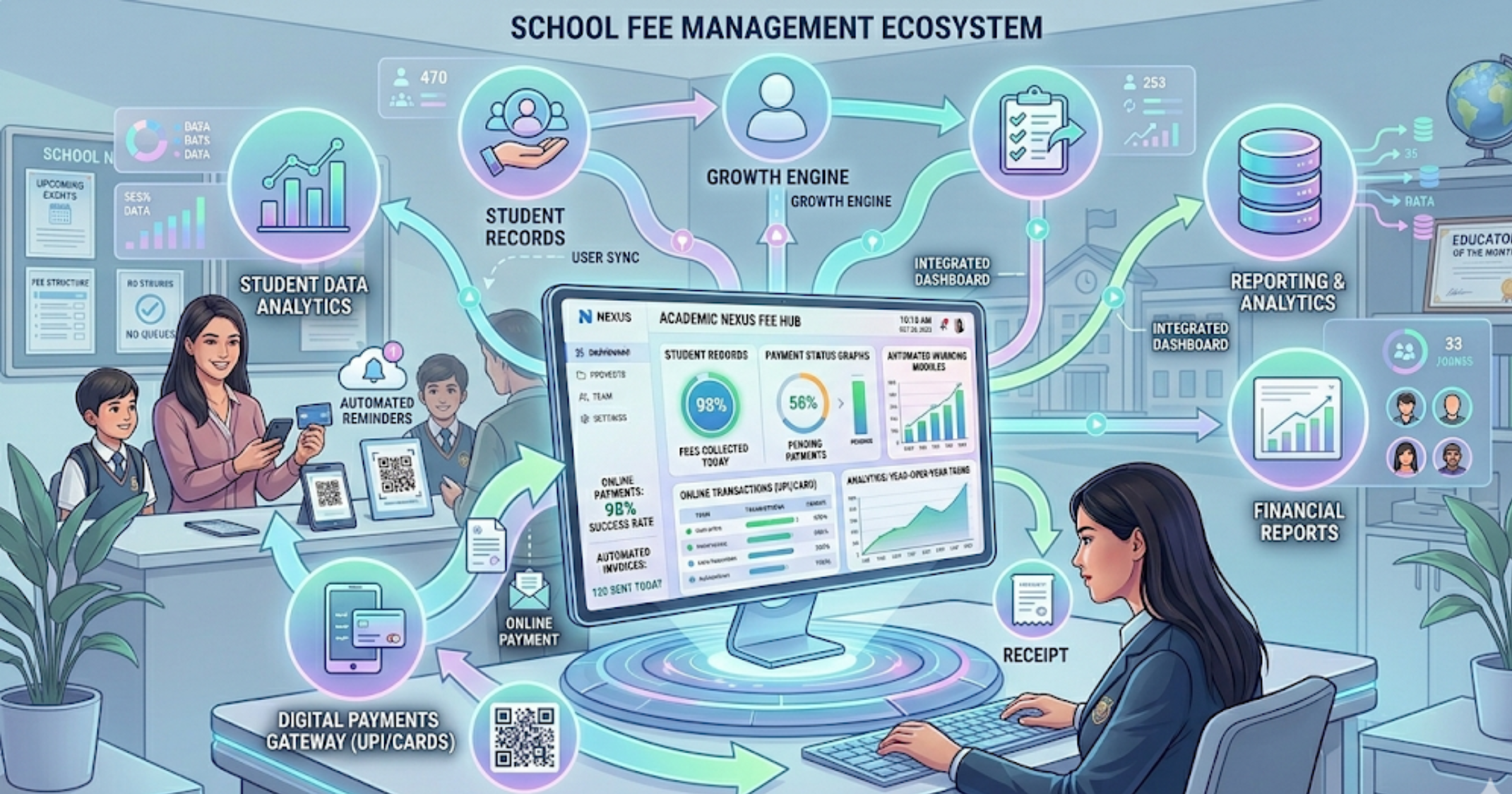
In essence, it is a digital fee payment mechanism that automates the whole end to end fee life cycle. From invoice and cost establishment to online payments, automatic reminders, reconciliation, and accounting exports. These central, auditable systems take the place of manual spreadsheets and cash transactions.
You might also hear terms such as school ERP charge module, school billing program, fee tracking software for schools, or automatic charge management system. They all indicate toward fewer unexpected actions and fewer hand procedures.
Top benefits of automating fee collection
Automation is more than a convenience. It changes how your school operates. Here are the main wins I see.
- Faster and predictable collections. Online payments speed up receipt of funds. You don't wait for checks to clear or for students to visit the office.
- Accuracy and fewer disputes. Digital invoices, clear ledgers, and instant receipts reduce errors and arguments about what was paid.
- Better cash flow visibility. Dashboards show outstanding amounts, collection rates, and aging. That makes budgeting and supplier payments less stressful.
- Less administrative work. Staff spend less time chasing parents and more time on strategic tasks.
- Improved parent experience. Parents like paying online. It's faster, trackable, and fits modern lifestyles.
- Stronger compliance and audit trail. Digital records make audits easier and reduce fraud risks.
Core features to look for in a school fee payment system
Not every solution is created equal. Here are features I consider essential when evaluating a school fee management software.
- Flexible fee structures. Ability to set term fees, monthly installments, transport charges, hostel fees, extra curriculars, one-time charges, and concessions.
- Automated invoicing and billing schedules. Generate invoices automatically based on student batches, grade, or fee head so nobody gets missed.
- Online payment acceptance. Support for multiple methods such as cards, bank transfers, UPI, mobile wallets, and direct debit.
- Recurring payments and auto-debits. For monthly plans or installment plans, automated collections reduce follow ups.
- Payment gateway and education payment gateway integration. Seamless integration with trusted gateways and banks for secure processing.
- Real time reconciliation. Match payments automatically to invoices and highlight exceptions for human review.
- Accounting exports and ERP integration. Export journal entries or integrate with your existing school ERP fee module to keep your books in sync.
- Role based access and audit trails. Give finance, admissions, and IT people access to specific functions and keep immutable logs for audits.
- Notifications and reminders. Automated SMS, email, or push notifications for invoices, upcoming due dates, and failed payments.
- Reporting and dashboards. Reports for collection rate, outstanding aging, refunds, and fee concession analysis.
- Mobile app or parent portal. A simple portal where parents can view invoices, pay, and download receipts.
- Refund handling and partial payments. Easy processing of refunds, reversals, and split payments.
- Security and compliance. Encryption, PCI compliance for card payments, secure backups, and data privacy safeguards.
Each of them has a distinct significance. For instance, automated reconciliations cut mistakes and save many hours. Integration with your school's ERP fee module keeps your accounting clean and avoids repeat work.
How automation improves daily operations
Let me give a concrete example. At one school I worked with, accounts staff used to manually reconcile the day's receipts with three bank slips, handwritten receipts, and a spreadsheet. It took a whole day and still left missing entries. After moving to an automated fee management system, reconciliation became a nightly process with exceptions flagged automatically. The time dropped from a day to less than an hour, and the team could close the month faster.
Automation also streamlines communication. Instead of calling or sending manual letters, the system sends a reminder when a fee is due and a follow up if it is overdue. That reduces awkward conversations and keeps relationships stronger.
Real features, simple examples
Features are easier to understand with short examples. Here are a few:
- Installment plans. Set a tuition fee of 60,000 and split it into three term payments. The system creates three invoices and schedules reminders. Parents pay online by clicking a link.
- Concessions and scholarships. Apply a 25 percent scholarship to a student's fee profile. The invoice automatically calculates the adjusted amount and shows the scholarship note.
- Transport allocation. Assign bus routes and automatically add monthly transport fees to invoices for selected students.
- Partial payments. A parent pays part of the fee today and the rest next week. The system records the partial payment and keeps the outstanding amount visible.
- Refunds. When a student withdraws, process a refund and generate a refund receipt for parents and accounting exports for the finance team.
Education payment gateway integration: what to check
When choosing a solution, integration with payment gateways matters a lot. Look for:
- Multiple payment options to match parent preferences
- Settlement timelines and bank charges
- Support for refunds and chargebacks
- Clear reconciliation files or API hooks
- Security certifications like PCI compliance
In practice, payment gateway setup can block a rollout if you do not plan for bank onboarding time and testing. Don’t treat this as a last minute task.
Implementation checklist - make it painless
Rolling out a new system is part technology and part people. I have found that schools who follow a checklist get far better results. Here’s a practical plan.
- Define goals. What are you trying to solve? Faster collections, fewer errors, better parent experience, or all of the above?
- Map current processes. Document how fees are created, approved, collected, reconciled and reported today. Include exceptions like scholarships and refunds.
- Clean your data. Duplicate or outdated student records cause the most headaches. Deduplicate and standardize contact information first.
- Configure fee heads and billing rules. Set up term dates, installment plans, concession codes and fine rules in the new system.
- Integrate with ERP and payment gateways. Connect the new system to your school ERP fee module and the chosen payment gateway. Test thoroughly.
- Pilot with a small group. Start with one grade or batch for a month. Learn from issues and refine before campus wide rollout.
- Train staff and parents. Host short training sessions, create quick guides, and run a helpdesk for the first month.
- Communicate clearly to parents. Share the benefits, payment options, and timelines. Provide a FAQ and a contact point for issues.
- Monitor and iterate. After go-live, monitor KPIs, fix issues, and add small improvements.
Small pilots are crucial. I once saw a school launch everything at once and then struggle with thousands of failed transactions. Piloting avoids that pain.
Common mistakes and how to avoid them
People often assume software will magically fix everything. It will not. Here are common pitfalls and practical ways to avoid them.
- Skipping data cleanup. Bad data leads to wrong invoices. Spend time cleaning student and guardian records first.
- Underestimating change management. Staff and parents need time to adjust. Communicate early and give hands on support.
- Poorly configured fee rules. Check fine structures and scholarship logic carefully. Small errors here create big reconciliation headaches later.
- Ignoring reconciliation exceptions. Letting uncleared transactions accumulate makes month end painful. Set aside time to resolve exceptions daily or weekly.
- Choosing a tool for price alone. The cheapest option may lack integrations or support. Account for the total cost of ownership, including bank charges and setup time.
- Inadequate testing. Test with real payment transactions during the pilot. Simulators do not always behave like actual gateways.
Measuring success: practical KPIs
Measure more than "system is live." Track metrics that show real improvement. Typical KPIs include:
- Collection rate within due period
- Average time to reconcile daily collections
- Reduction in cash transactions
- Number of billing disputes
- Parent satisfaction rates from a short survey
- Time staff spend on fee related tasks per week
For example, a small town school I worked with brought collection rate from 70 percent to 90 percent within one term after launching online fee collection for schools and running reminders. That made budgeting easier and reduced short term borrowing.
How to estimate cost and ROI
Cost and return will vary by school size and payment volume. Consider these line items:
- Implementation and setup fees
- Monthly or annual subscription
- Payment gateway charges and settlement fees
- Staff training and change management time
- Savings from reduced manual work and happier cash flow
Don't forget hidden savings. Less cash handling lowers security risk. Faster reconciliation reduces accounting hours. And fewer disputes saves administrative time. Add those to the equation and ROI often becomes clear within a term or two.
Choosing the right vendor - questions to ask
Vendor evaluation is not just about features. Ask practical questions to avoid surprises.
- How does your product integrate with our existing school ERP fee module and accounting systems?
- Which payment gateways do you support and what are the settlement timelines?
- Do you offer API access for custom integrations?
- What is the typical onboarding timeline and who handles data migration?
- How do you handle refunds, chargebacks, and failed payments?
- What security certifications do you have, and how do you protect payment data?
- What training and support are included? Is there a dedicated account manager?
- Can we run a pilot in one department before campus wide rollout?
- Do you provide references from similar schools?
One practical tip: ask for a demo that maps directly to your fee heads and billing schedules. If the vendor can show your exact scenarios, it is a good sign they understand the education domain.
Integration with school ERP and accounting
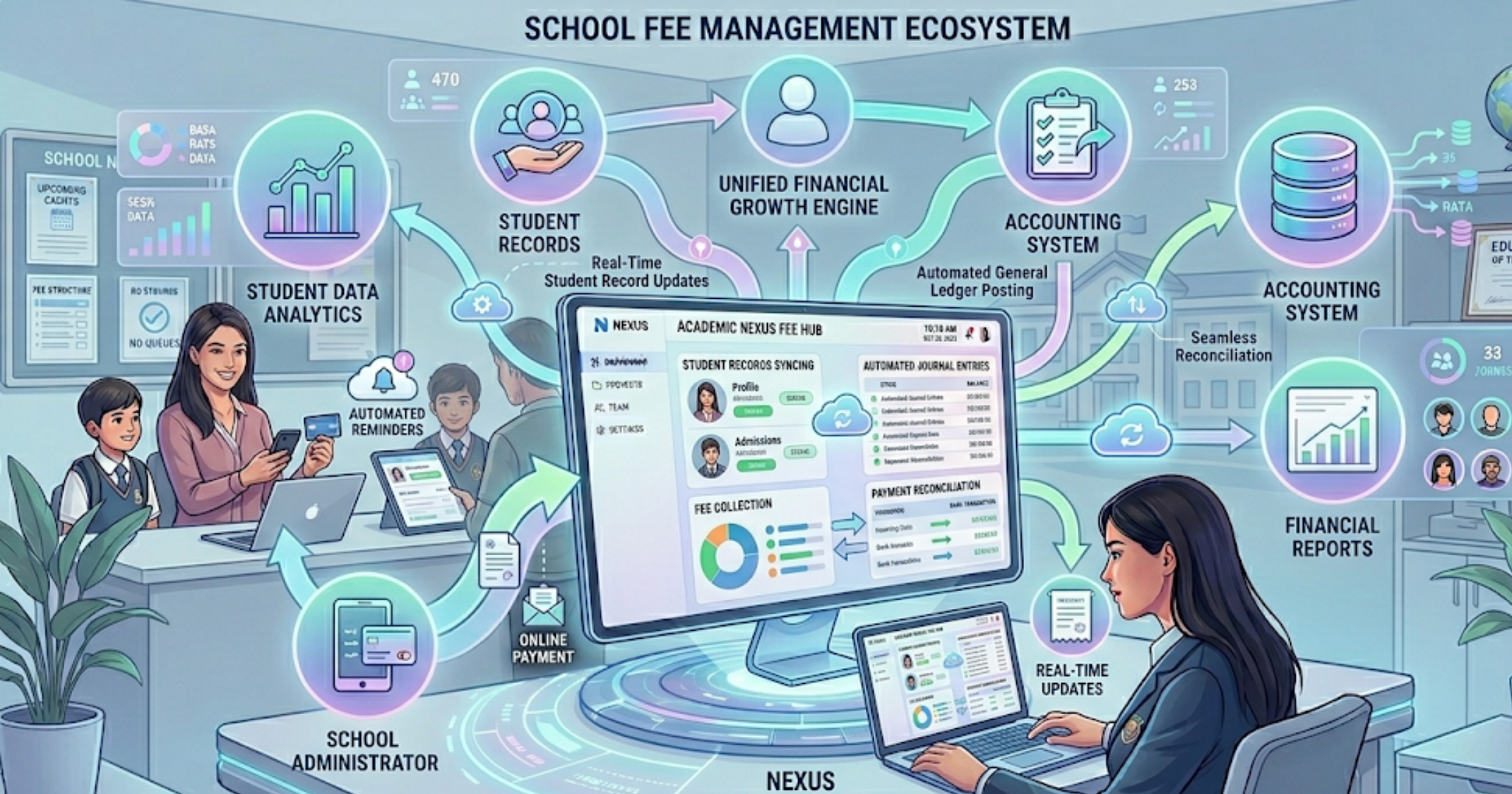
Integration avoids double entry by allowing systems to auto post financial data directly into your ERP and accounting software. Your fee collection system should either be part of a school management system or integrate cleanly with your existing ERP fee module Look for:
- One click export of journal entries
- Mapping of fee heads to your chart of accounts
- Student and guardian synchronization
- Payment recon data that matches bank statements
Without integration, you will still save time on collection but lose gains on accounting efficiency. In my experience, a tight integration gives the biggest administrative benefit.
Security and compliance: what matters
Payments are sensitive. You need a vendor that treats security seriously. Key points:
- PCI compliance for card data processing
- Strong encryption at rest and in transit
- Role based access controls
- Audit logs and immutable transaction records
- Regular backups and disaster recovery plans
- Clear privacy policy around student and parent data
Ask for security documentation and a recent audit report where possible. If your school must comply with local data residency rules, confirm data storage locations up front.
Change management: training staff and parents
Technology is easy. Changing habits is not. Allocate time and resources to help people adopt the system.
For staff, run short hands on sessions. Walk through creating invoices, applying concessions, and running reconciliations. For parents, create a one page guide and a short video showing how to pay a fee and download receipts. Offer a help line during the first month.
One quick trick I have used is to place a laptop in the admissions office for the first week of rollout. Parents who preferred paying in person could use the kiosk and staff could guide them. That made the transition smoother.
Real world use cases
Different schools have different needs. Here are practical scenarios and how a digital fee payment solution handles them.
- K-12 schools. Term fees, transport fees, optional activity fees, sibling discounts, and scholarships. Automated billing per class and parent portal for receipts.
- Colleges and universities. Semester fees, hostels, labs, and exam fees. Integration with student information systems and ERP accounting.
- Boarding schools and hostels. Recurring monthly hostel charges, meal plans, damage deposits, and refund workflows for early withdrawals.
- Co-located institutions. Schools sharing a campus with sports or after school centers need consolidated billing with different fee heads.
In each case, the same principles apply: automate billing, provide clear payment options, and keep reconciliation simple.
Common customizations schools ask for
Schools often need small customizations. Typical requests include:
- Custom invoice templates with school logo and terms
- Scholarship approval workflows with multi level authorization
- Automatic sibling discounts
- Custom reports for the board or trustees
- Localization for currency, language, and payment methods
Good vendors let you configure these without costly custom builds. Ask early and plan for a short window to test the custom flows.
How to handle refunds and reversals
Refunds happen. A student withdraws, a payment fails, or a duplicate payment occurred. Your system must make refunds traceable and easy to process.
Best practice is to have a clear refund policy and a workflow that requires approval before funds are released. Keep records for every refund and reconcile them weekly.
Support and ongoing maintenance
After go-live, support matters. Look for SLAs on response time, a clear escalation path, and access to product updates.
Also clarify who handles payment gateway or bank issues. Typically the vendor helps troubleshoot payments but banks or gateways may need direct contact for settlements.
Frequently asked questions
Below are short answers to questions I hear a lot.
- Will parents who prefer cash be left out? No. You can accept cash at designated counters and record the payment in the system. Encourage online payments for convenience but keep a fallback process.
- How long does implementation take? Small pilots can launch in a few weeks. Full rollouts depend on integrations and data quality and typically take 6 to 12 weeks.
- Do we need a separate payment gateway? Most vendors integrate with many gateways. You can use an existing gateway if supported or choose a recommended gateway during setup.
- What if a payment fails? The system should flag failed transactions and retry or notify parents automatically.
FAQs
1. What is school fee management software and how does it work?
School fee management software is a digital solution that automates the entire fee lifecycle—from invoice generation and online payments to reminders, reconciliation, and reporting. It reduces manual work and improves accuracy.
2. How does Schezy school fee management software improve fee collection?
Schezy streamlines fee collection by enabling online payments, sending automated reminders, and providing real-time tracking of dues. This helps schools increase on-time payments and reduce follow-ups.
3. Is online fee payment secure for schools and parents?
Yes, modern systems like Schezy use secure payment gateway integrations, encryption, and compliance standards such as PCI to ensure safe transactions and data protection.
4. How long does it take to implement a school fee management system?
Implementation timelines vary, but most schools can launch a pilot within a few weeks and complete full deployment in 6–12 weeks, depending on data readiness and integrations.
Final checklist before you buy
Here is a quick decision checklist to use in vendor selection:
- Does it handle all your current fee scenarios and edge cases?
- Does it integrate with your ERP and accounting software?
- Is the payment gateway ecosystem suitable for your parents?
- Are security and compliance covered?
- Can you pilot first and scale up?
- What are the total costs and expected ROI?
- Is support responsive and local or regional?
Why Schezy can help
If you are evaluating options, Schezy builds a modern automated fee management system focused on schools and colleges. I like that Schezy balances practical features with a straightforward implementation approach. They support school ERP fee module integrations, education payment gateway integration, and common fee use cases like transport, hostel, installment plans, and concessions.
Schezy is designed to reduce reconciliation time, improve collection rates, and give clear audit trails. If you want a partner who understands education finance workflows and cares about a smooth rollout, they are worth a look.
Helpful links & next steps
- Schezy - School Fee Management
- Schezy Blog
- Contact Us
- info@schezy.com
If you are ready to see how digital fee payment solutions for schools work in practice, Book your free demo today and run through your own fee scenarios with an expert. Live demos surface questions fast and show how the system will handle your real world cases.
If you want a short summary you can share with your team, here it is: clean your data, pilot the system, pick a vendor that integrates with your ERP, and measure collection rate and reconciliation time. Do that and you will see real improvements in months not years.
Good luck. If you have specific questions about your fee structure or want help mapping your current process to a digital fee management workflow, reach out to Schezy or schedule a demo. A short conversation can save weeks of guesswork.